ApeX Omni is a self-custodial perpetual-futures DEX at omni.apex.exchange. You sign up with an email (ApeX creates an embedded wallet for you) or by connecting your own EVM wallet; there is no gas to register and no deposit is required. Fund the account with USDT on Ethereum, BNB Chain, Base or Arbitrum (TRON USDT and card deposits also work), move it from the Funding account to the Perp account, then trade 100+ perps with up to 100x leverage at 0.02% maker / 0.05% taker. ApeX never holds your seed phrase — which also means nobody can recover it for you.
ApeX Omni at a glance
| What it is | Perpetual-futures DEX (order book), self-custodial; built on zkLink X |
|---|---|
| Official app | omni.apex.exchange — main site www.apex.exchange |
| Sign-up | Email (embedded Privy wallet) or EVM wallet such as MetaMask, Rabby or WalletConnect; gas-free, no deposit needed |
| Deposit networks | Ethereum, BNB Chain, Base, Arbitrum (Mantle: USDT Bridged suspended); TRON USDT deposit-only; card via Alchemy Pay |
| Collateral | USDT; cross-collateral also accepts USDC, WBTC, WETH, ETH, cmETH, mETH, USDe, cbBTC |
| Trading fees | 0.020% maker / 0.050% taker at the base tier; lower with 14-day volume or APEX staking |
| Leverage / margin | Up to 100x on some pairs; cross margin only |
| Funding | Every hour; positive rate means longs pay shorts |
Before you start: open the real ApeX site
Search results for “ApeX login” and “ApeX Omni wallet” are full of clone sites that copy the ApeX design and ask you to “connect” or “verify” a wallet. They exist to drain wallets. Type the address yourself or use a bookmark.
ApeX’s own channels are: www.apex.exchange and the app at omni.apex.exchange; docs at apex-pro.gitbook.io/apex-pro and api-docs.omni.apex.exchange; X @OfficialApeXdex; Telegram t.me/ApeXdex; Discord through www.apex.exchange/discord. Support works through Discord tickets; treat any unsolicited DM offering help as a scam.
- Never use look-alike hosts such as *.pages.dev, *.daftpage.com, *.blogspot.com or *.github.io pages titled “ApeX Omni Login” or “ApeX Wallet” — clones of this kind were live in search results when this guide was checked.
- ApeX is a derivatives platform. Check the ApeX Terms of Use for restricted countries before you sign up; a VPN does not change whether you are allowed to use it.
- Perpetual futures with leverage can lose more than you expect quickly. Start with a small amount and low leverage until you know the screens.
Step 1 — Create your account
Go to omni.apex.exchange and click Connect Wallet in the top-right corner. ApeX offers two ways in; registration is gas-free and does not require a deposit.
- Email: choose email, enter your address, click Continue, type the verification code ApeX emails you, then confirm on the Create Account page. ApeX creates an embedded wallet for you through Privy, so you do not need MetaMask.
- Wallet: choose your wallet (MetaMask, Rabby, WalletConnect and other supported wallets, including mobile wallets such as Ledger Live, SafePal, OneKey, Tangem and Zerion), then approve the signature request.
- The signature only proves you own the wallet. In the background it creates your ApeX trading keys (“zkKeys”), which sign every order, transfer and withdrawal from then on. It is a message signature, not a transaction — it costs no gas and moves no funds.
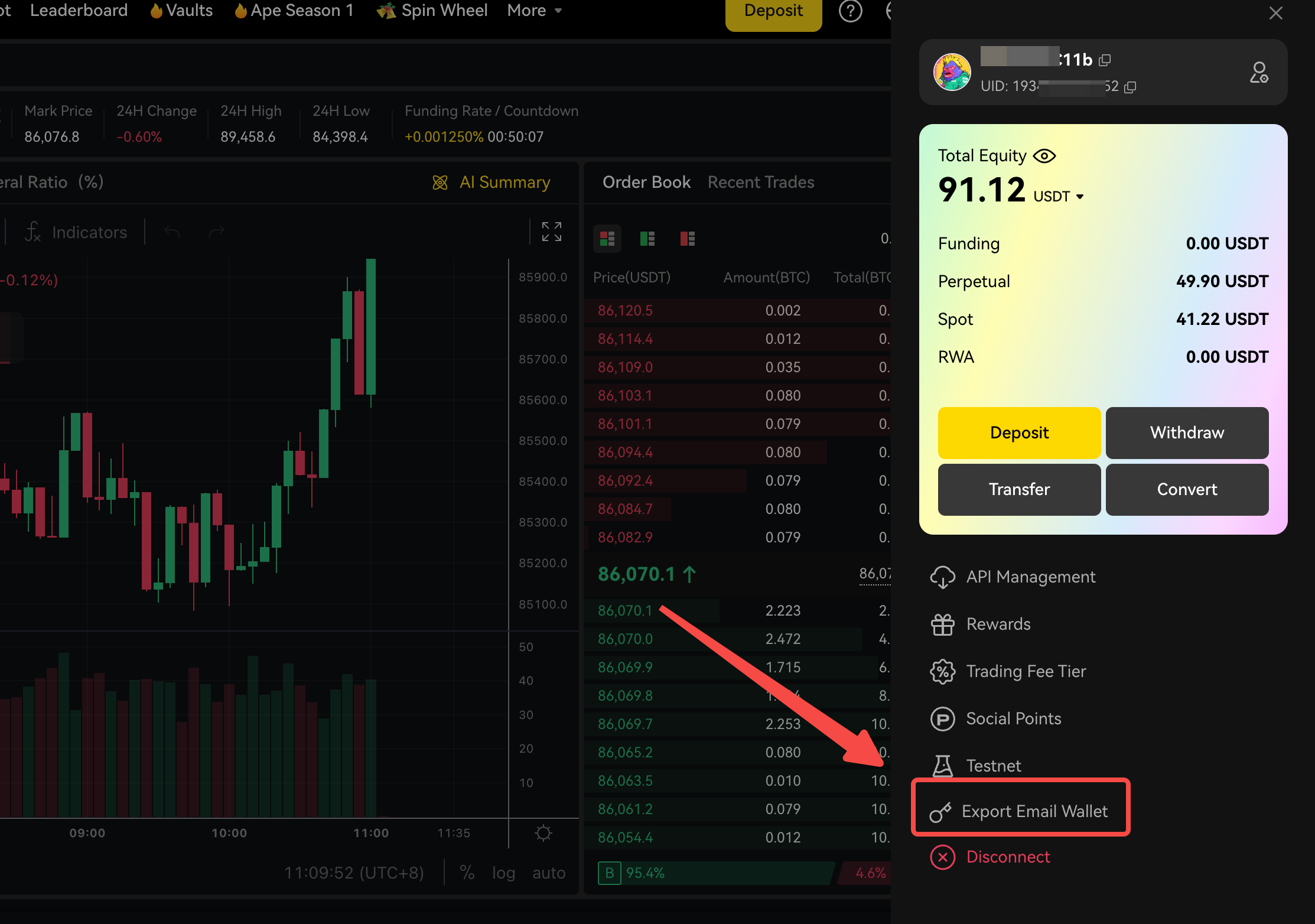
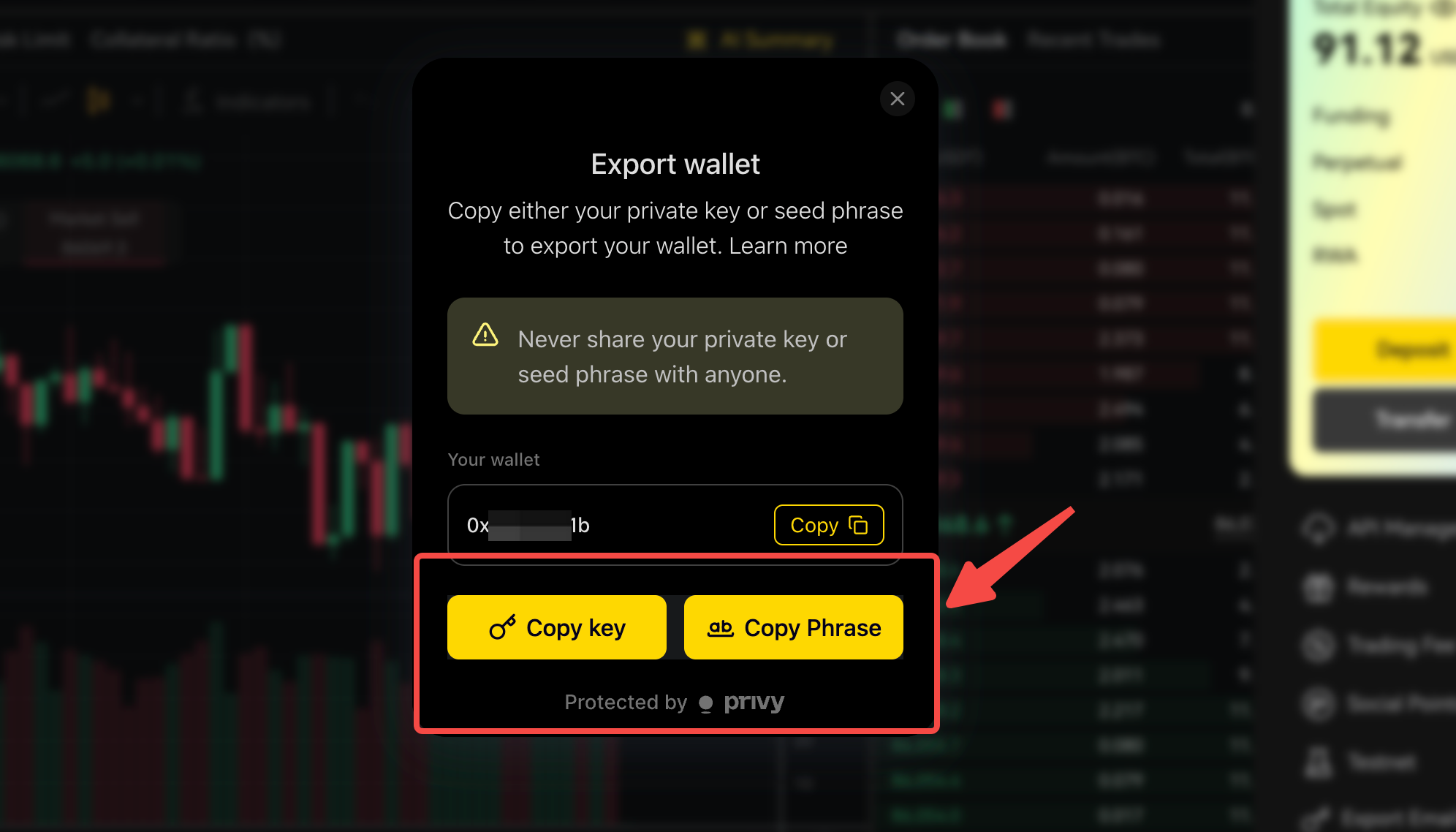
- If you use the email login, you can export the wallet’s private key later: profile icon → Export Email Wallet → Copy key. Store it offline and delete any copy right after you import it into a wallet.
Step 2 — Deposit funds
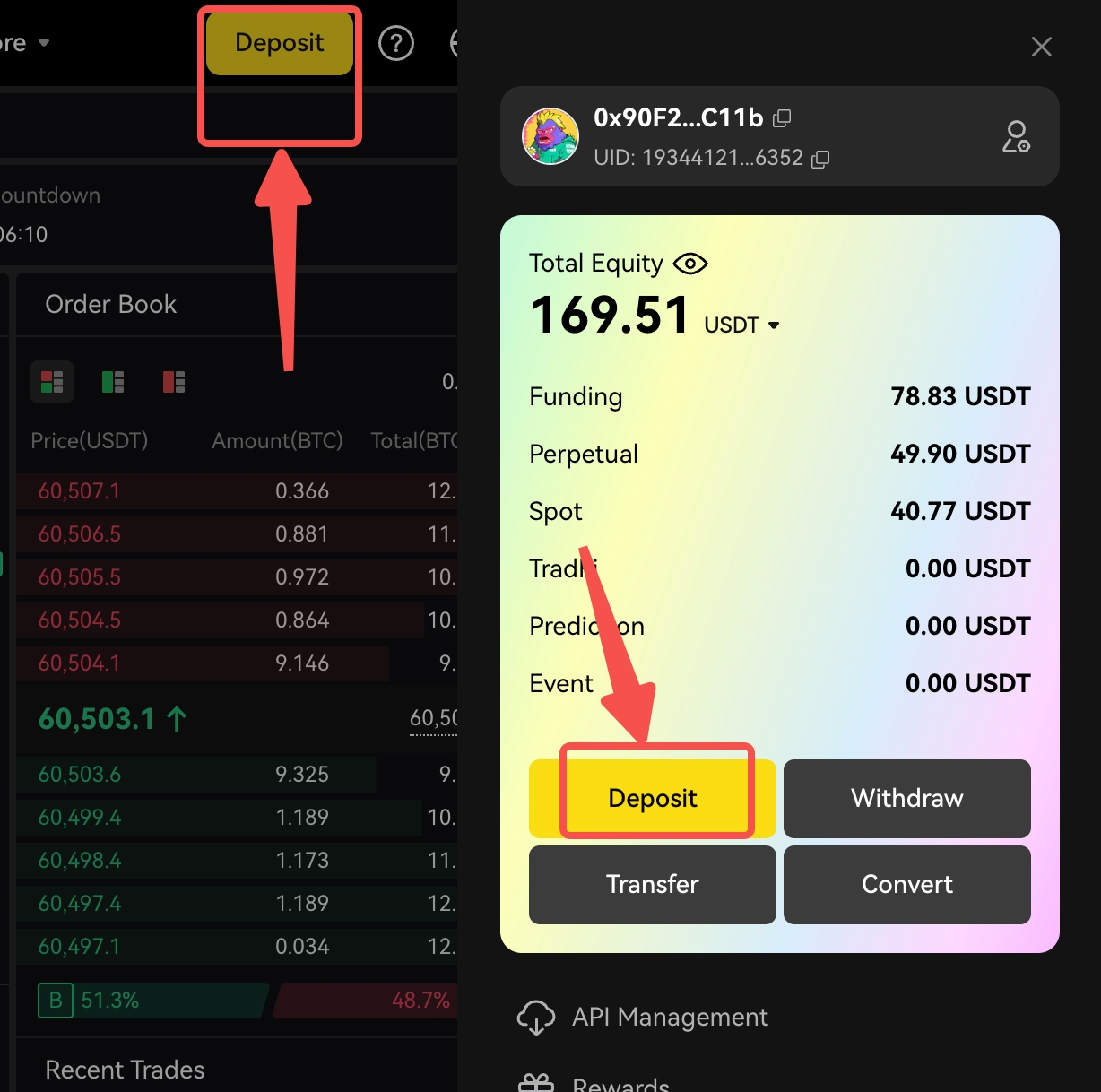
Every deposit lands in your Funding account. To trade perps you then move it to the Perp account (Step 3).
- Wallet users: open Deposit, pick the network (Ethereum, BNB Chain, Base or Arbitrum) and the asset, enter the amount and confirm in your wallet. The funds appear shortly after the network confirms.
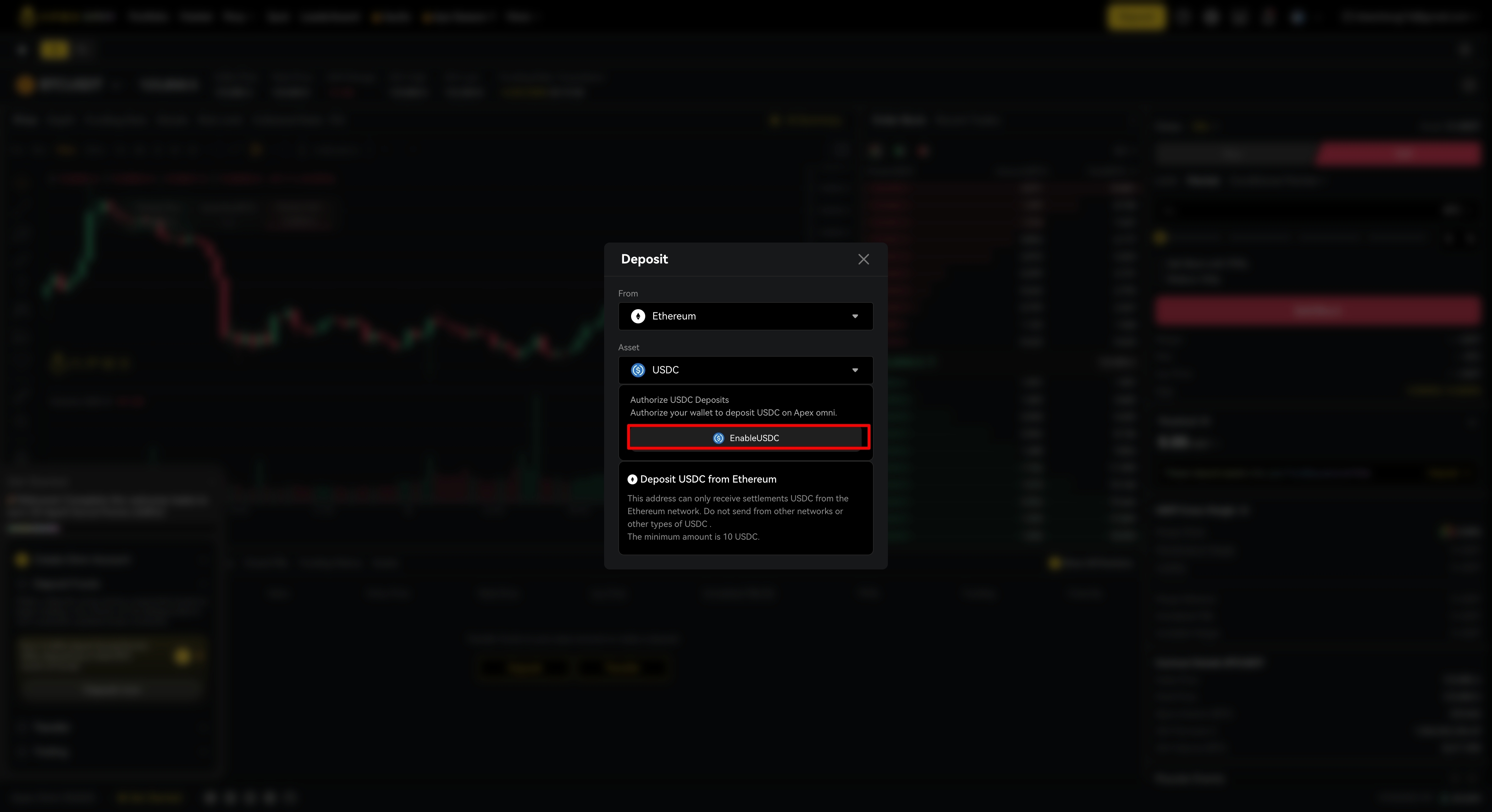
- Email users: click your account name → Deposit, pick the network and token, copy the deposit address and send from any wallet or exchange. If the Deposit window shows an Enable button, click it first — ApeX’s October 2025 Privy upgrade issued new deposit addresses (the mobile app must be version 3.33.3 or later). Never reuse an older address.
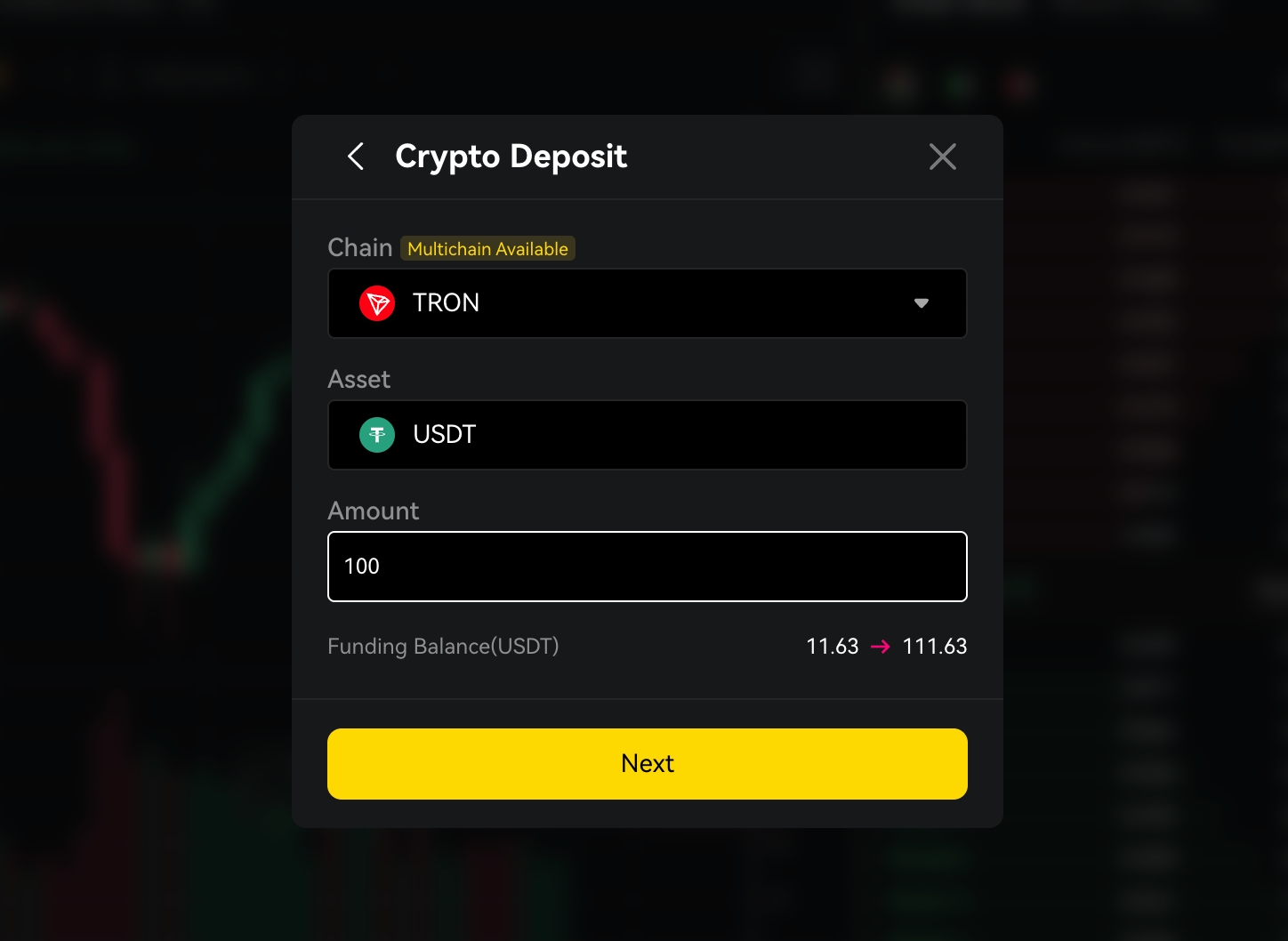
- USDT on TRON (deposit only): choose Crypto Deposit, Chain = Tron, Asset = USDT. Each address and QR code is single-use, so start a new deposit every time. Limits are 5–10,000 USDT per transaction, usually credited within 3–5 minutes, with no ApeX fee. The paying wallet does not need to be yours. TRON withdrawals are not available.
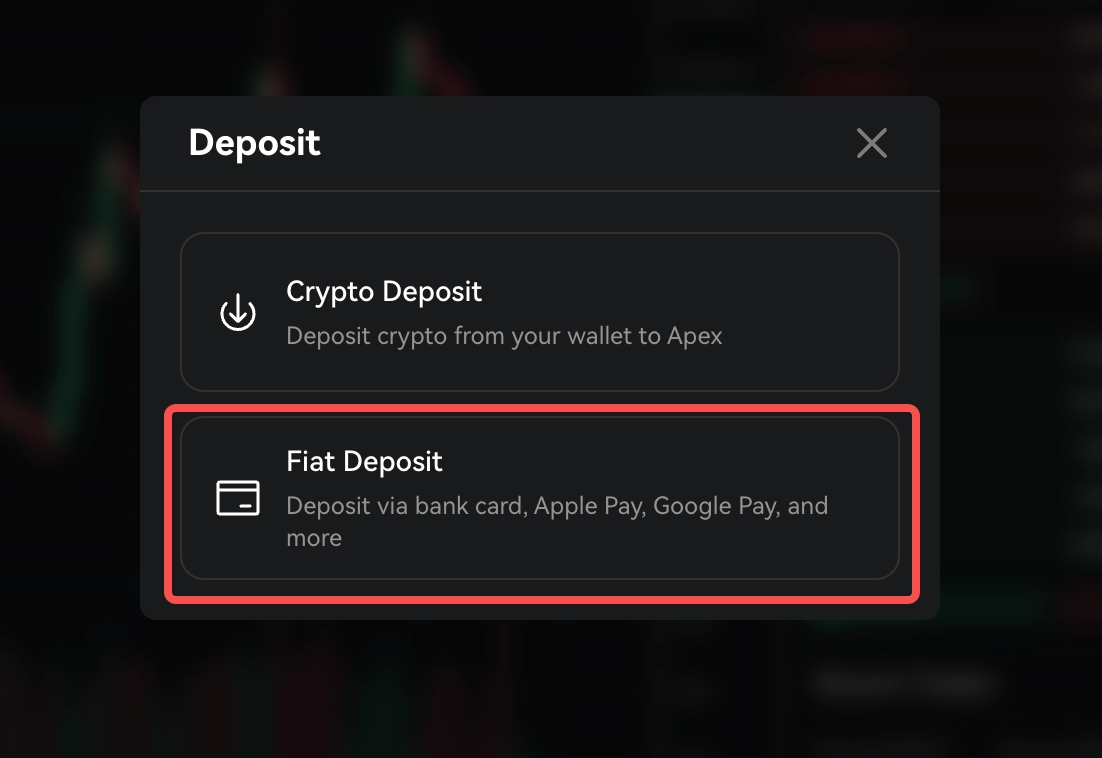
- Card or bank card: Deposit → Fiat Deposit → choose currency and amount → confirm. Payments run through Alchemy Pay (Visa, Mastercard, Apple Pay, Google Pay, 40+ currencies); first-time users complete a quick identity check with Alchemy Pay, and most deposits arrive within a minute. Check the fee Alchemy Pay shows before you pay.
- Send only the asset and network you selected. USDT sent on the wrong chain, or to a single-use TRON address a second time, may need a manual recovery through a Discord ticket — or may not be recoverable.
- Mantle: USDT (Bridged) deposits and withdrawals were suspended on 2026-06-09 (Mantle’s current USDT is USDT0). Use another network.
- Main collateral is USDT. USDC, WBTC, WETH, ETH, cmETH, mETH, USDe and cbBTC are accepted as cross-collateral; the value of non-stablecoin collateral moves with the market, and so does the margin it gives you.
Step 3 — Place your first trade
ApeX Omni lists 100+ perpetual contracts — crypto plus stock and other real-world-asset perps — with leverage up to 100x on the largest pairs. Spot trading closed on 2026-08-05; prediction markets are a separate product.
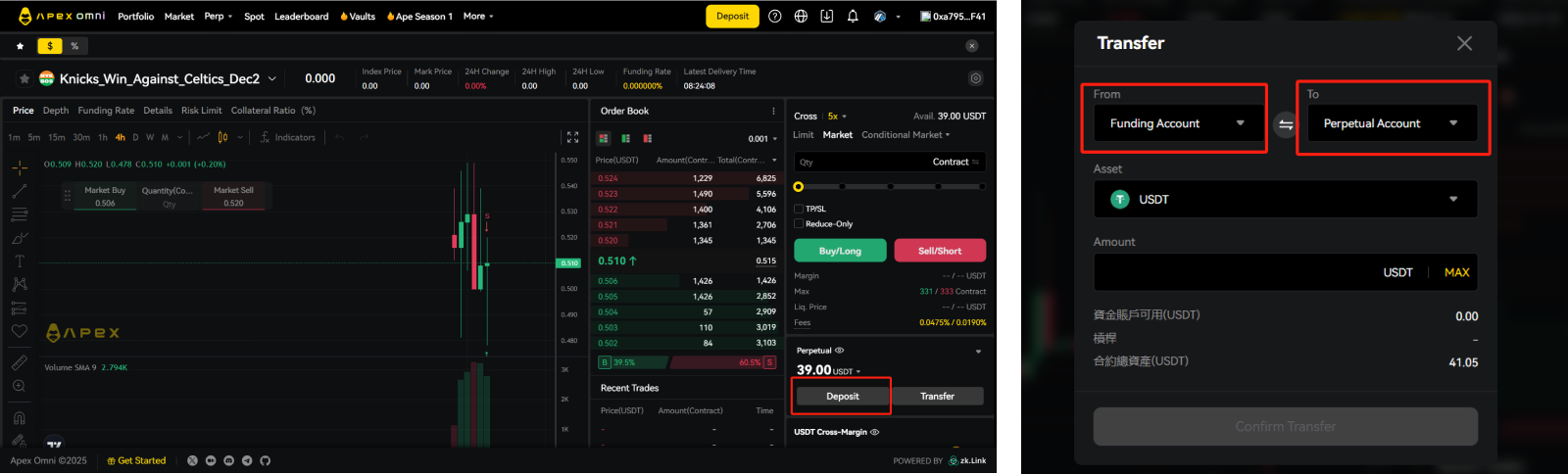
- Transfer: click Transfer and move USDT from the Funding account to the Perp account.
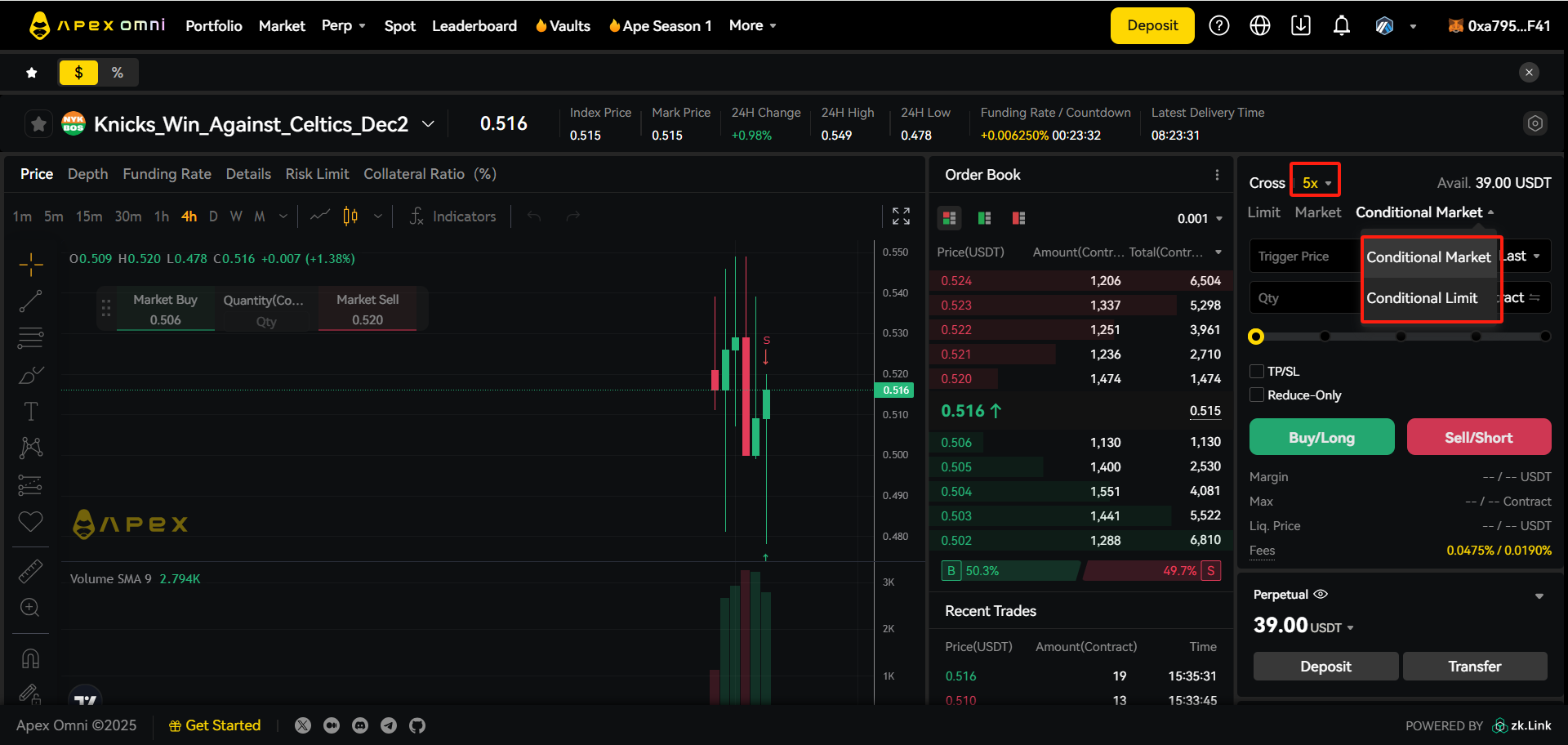
- Pick a market (for example BTC-USDT) and set leverage. Higher leverage means a smaller price move liquidates you; for a first trade, 2–5x is plenty.
- Choose the order type: Market fills now at the best price; Limit waits for your price (add Post-only to be sure you pay the maker fee, Reduce-only so it can only shrink a position); Conditional market/limit orders trigger when price reaches a level.
- Enter the size, add a take-profit and stop-loss (TP/SL orders are reduce-only and can trigger on last, mark or index price), check the estimated liquidation price, and confirm. The order is signed with your zkKeys — no wallet pop-up and no gas.
- Manage the position under Positions: add margin, adjust TP/SL, reverse, or close at market or limit.
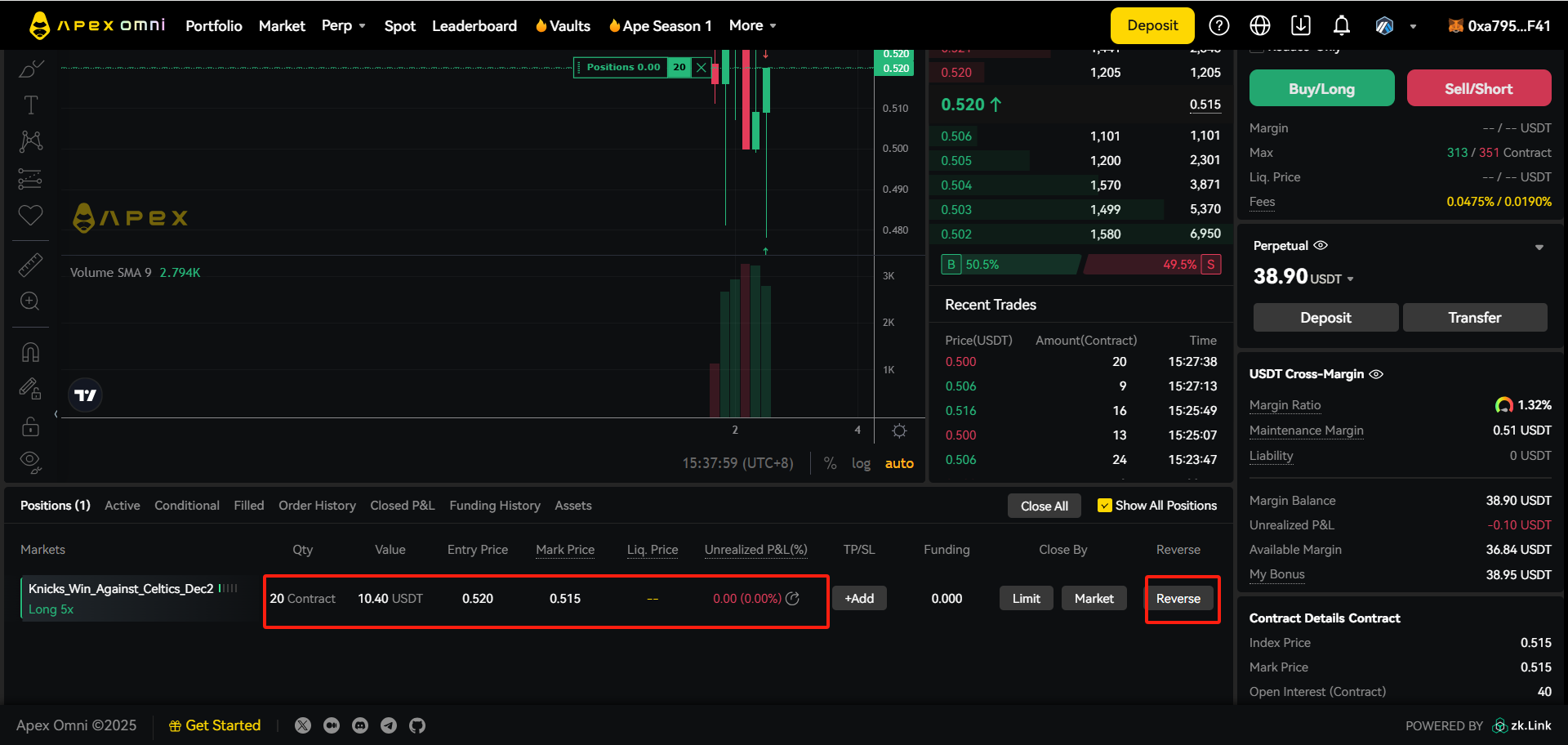
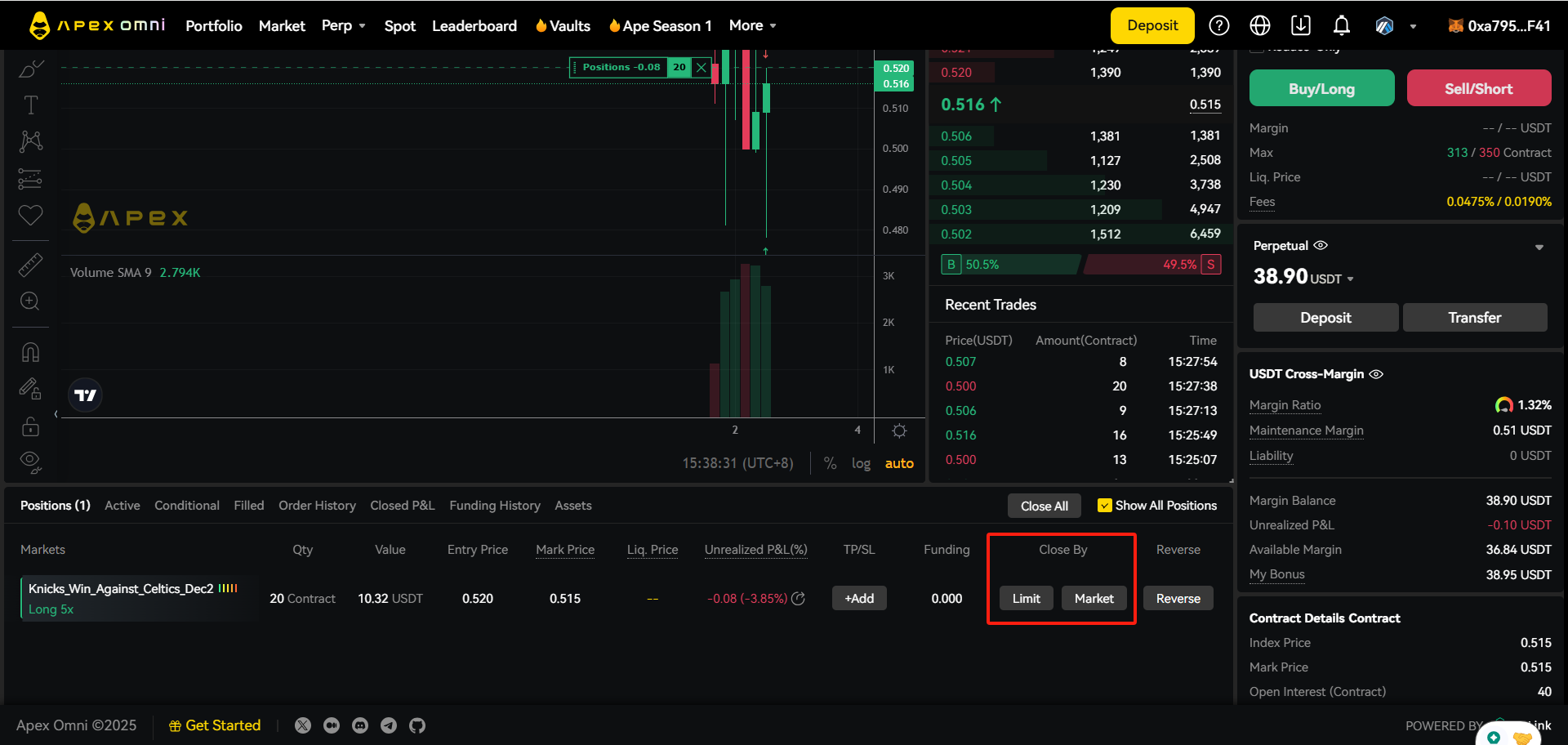
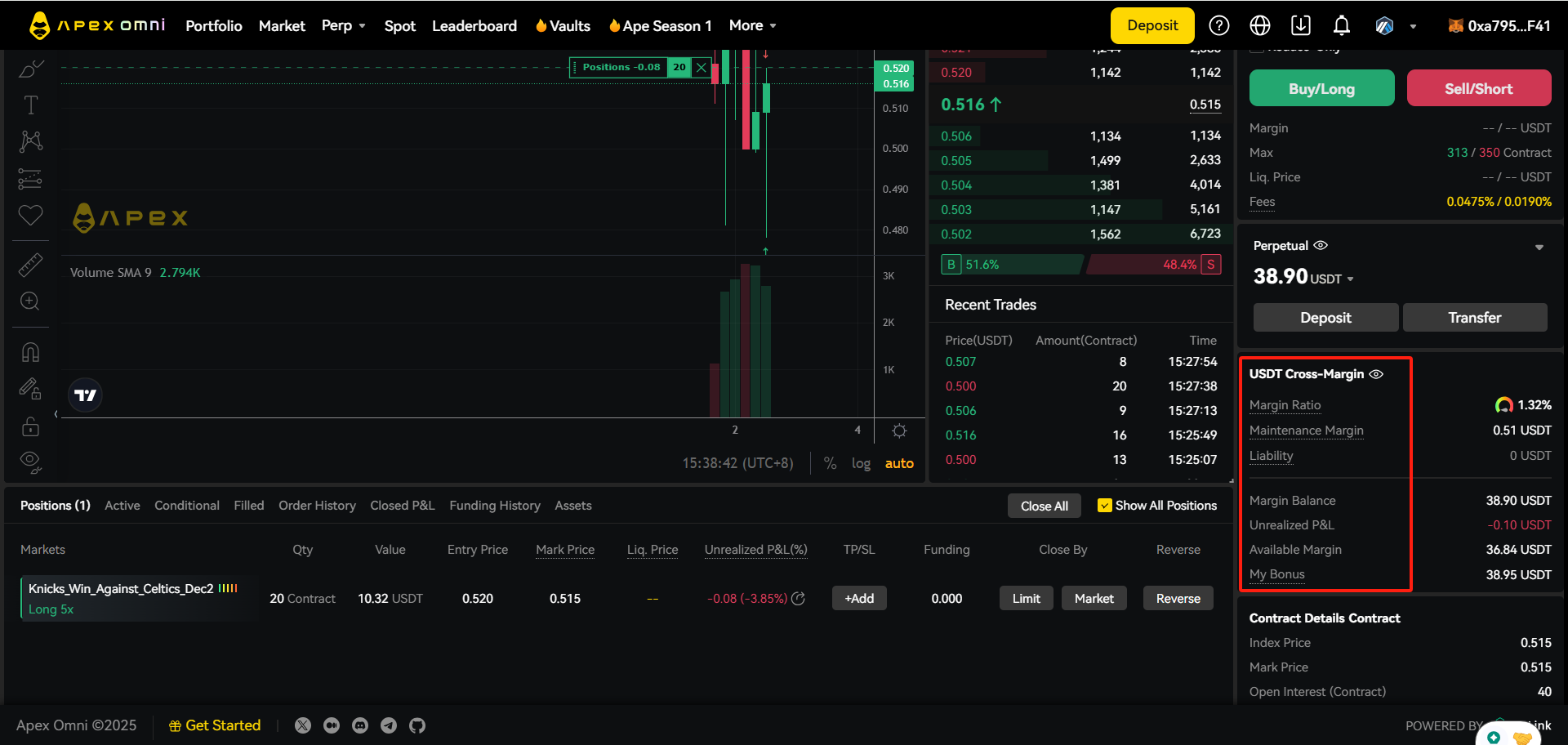
- Fees: 0.020% maker / 0.050% taker at the base tier. VIP tiers lower this using 14-day perps volume or staked APEX + esAPEX (for example VIP2 at $5M volume or 25,000 staked: 0.015% / 0.045%). Tiers are recalculated daily at 07:00 UTC; referral discounts and VIP do not stack.
- Funding is exchanged every hour. When the rate is positive, longs pay shorts; when it is negative, shorts pay longs.
- ApeX runs cross margin only: all Perp-account balance backs all positions, so one losing position can draw on the margin of the others.
- Liquidation is triggered by the mark price (a median of index- and basis-adjusted prices and the last trade), not by a single wick of the last price. When your margin ratio reaches 100%, positions are closed at market, and auto-deleveraging can cover a shortfall.
Step 4 — Withdraw
Close or reduce positions first: margin that backs open positions cannot be withdrawn. The withdrawal window shows how much is available; if it is lower than you expect, use Transfer to move USDT from the Perp account back to the Funding account.
- Click Withdraw, choose the asset and the network you want to receive on: Ethereum, BNB Chain, Base or Arbitrum. TRON is deposit-only, and Mantle USDT (Bridged) is suspended.
- Check the destination address shown in the window. Email users enter an EVM (L1) address they control and verify it; send to a wallet you own, or to an exchange deposit address for the same token and network.
- Read the fee and the amount you will receive before confirming. ApeX quoted fees starting from 1 USDT plus network gas for email-wallet withdrawals; the current fee, minimum and any fast-withdrawal option are shown in the withdrawal window, and they change with network costs.
- Confirm the withdrawal (it is signed with your zkKeys) and keep the transaction ID until the funds arrive.
- Deposits and withdrawals can pause during announced maintenance. If a withdrawal stays pending well beyond the estimate, check ApeX’s X and Discord announcements, then open a Discord ticket with the transaction ID — never through anyone who messages you.
- Withdraw on a network your destination supports. An exchange account that only accepts USDT on TRON cannot receive an Arbitrum transfer.
How ApeX keeps funds secure — and the limits of that
Self-custody: ApeX does not hold your private keys. Your funds sit in the platform’s smart contracts on each supported chain, and only signatures from your keys can move them.
Settlement layer: ApeX Omni runs on zkLink X. Trades are executed off-chain for speed, then batched; each batch carries a zero-knowledge proof that is verified by a contract on the main chain, and the state is synchronised to the other supported chains. The proof is designed so that the operator cannot post a balance change that your signatures did not authorise.
Escape hatch: zkLink’s documentation describes a forced withdrawal (requestFullExit on the main-chain contract) and an “exodus mode” in which, if the operator stops processing requests, the contract freezes and users withdraw with a Merkle proof of their balance. ApeX has run a forced-withdrawal process before: when the earlier ApeX Pro (StarkEx) platform was shut down in July 2025, users withdrew through it.
Trading keys: the zkKeys that sign your orders are derived from your wallet signature. Whoever holds them can trade and withdraw, so treat them like a seed phrase — especially if you export them to use the API.
What is not guaranteed: smart-contract bugs, upgrade keys held by the team, oracle or mark-price errors, auto-deleveraging in extreme moves, and front-end attacks remain possible on any DEX. When this guide was checked we could not find a published audit report that names ApeX Omni’s current contracts (zkLink’s audits by ABDK and Secure3 cover zkLink’s own systems), and independent sources disagree on whether Omni’s data is fully posted on-chain. Read L2BEAT’s ApeX Omni page for an independent view of upgradeability, data availability and exit windows before you keep large balances there.
What you have to do yourself
On a self-custodial exchange, most of the security is in your hands. This checklist covers the things ApeX cannot do for you.
- Keep your seed phrase and private keys offline and never type them into a website, form or chat. ApeX support will never ask for them; anyone who does is a scammer.
- Use a hardware wallet for larger balances and a separate wallet for trading, holding only what you are prepared to trade.
- Read every signature request. Logging in should only ask you to sign a message (the ApeX onboarding message, no gas); a request to approve token spending or send a transaction should appear only when you deposit, and only for the amount you chose.
- Review and revoke token approvals you no longer need, for example with your wallet’s approval manager or a revoke tool, especially after using unfamiliar sites.
- Email-login accounts: your email is the key to your wallet. Use a strong, unique password and two-factor authentication on the email account itself. If you export the private key, store it offline and delete every digital copy.
- API users: the apiKey, the seeds and the l2Key give full trading and withdrawal power. Keep them out of code repositories, screenshots and logs (ApeX’s sample scripts print them to the console), and rotate them if they are exposed.
- Bookmark omni.apex.exchange, ignore ads and DMs offering “support”, “airdrops” or “wallet validation”, and check the domain before you connect.
- Double-check network and token on every deposit, use a fresh TRON address each time, and send a small test amount first when you use a new route.
- Control leverage: set a stop-loss, keep extra margin because cross margin shares it across positions, and add margin or reduce leverage before announced maintenance windows.
- Do not keep more on any exchange — centralized or decentralized — than you are actively using. Withdraw profits to your own wallet.
ApeX Omni FAQ
Is ApeX Omni a centralized or decentralized exchange?
Decentralized and self-custodial: you trade from your own wallet (or an embedded wallet created from your email), and withdrawals are signed by your keys. The order book and matching run off-chain, while balances are settled with zero-knowledge proofs on the main chain.
Do I need KYC to use ApeX Omni?
Signing up with a wallet or an email does not ask for identity documents in ApeX’s guide. Card deposits through Alchemy Pay require a short verification with Alchemy Pay. Check the ApeX Terms of Use for countries where the service is not offered.
What is the minimum deposit?
TRON USDT deposits accept 5–10,000 USDT per transaction. For the EVM networks the app shows the current minimum on the deposit screen; when email sign-up launched on Arbitrum, ApeX quoted 10 USDT.
How much are the trading fees?
0.020% for maker orders and 0.050% for taker orders at the base tier, with no gas for trading. Higher tiers (by 14-day volume or staked APEX) go down to 0.000% maker and 0.025% taker.
Can I lose my funds if ApeX shuts down?
The design lets you withdraw directly from the main-chain contract through a forced withdrawal or exodus mode if the operator stops working, and ApeX ran such a process when ApeX Pro closed in 2025. That protection depends on the contracts working as intended, so treat it as a safety net, not a guarantee.
I signed up with email — where is my seed phrase?
There is none to write down at sign-up: the embedded wallet is tied to your email login. You can export its private key from your profile (Export Email Wallet). Keep your email account secured with two-factor authentication.
Sources
- ApeX blog — How to trade on ApeX Omni (getting started, updated 2025-07-25)
- ApeX blog — ApeX × Privy: email sign-up (2025-03-18)
- ApeX blog — Privy wallet integration upgrade (2025-10-06)
- ApeX blog — Export your email-wallet private key (2025-12-31)
- ApeX blog — Fiat deposits via Alchemy Pay (2026-07-04)
- ApeX blog — Weekly update: TRON USDT deposits (2026-09-14)
- ApeX blog — Mantle USDT (Bridged) discontinued (2026-06-09)
- ApeX blog — Order types for perps (2026-07-16)
- ApeX blog — Leverage, margin and liquidation price (2026-07-14)
- ApeX blog — Guide to trading prediction markets (transfer, order and position screens)
- ApeX blog — ApeX Omni × zkLink X (2024-06-20)
- ApeX blog — ApeX Omni litepaper (2024-05-09)
- ApeX blog — ApeX Pro forced-withdrawal process (2025-07)
- ApeX fee schedule (apex.exchange/fees.md, verified by ApeX 2026-08-10)
- ApeX Omni API documentation (chains, collateral, funding, signing keys)
- ApeX Omni GitBook (official docs)
- zkLink docs — security outline, forced withdrawal and recovery
- L2BEAT — ApeX Omni risk page (independent)
Checked against official ApeX sources on 2026-11-11. Fees, networks, limits and features change; the ApeX app and announcements are authoritative. Images are ApeX’s own, from the linked official articles. This page is educational, not financial advice, and contains no referral link.
